
The Verdict
One wall outlet, a laptop, a phone, a tablet, and somebody asking where their charger went. Apparently electricity now requires a family meeting. If you want one USB-C wall charger for several devices, start with what those devices need at the same time. For a laptop-and-phone setup, Anker Prime 100W A2688 is my Amazing middle ground. Prime 67W A2669 is Good for a lighter load. Anker 140W A2697 is Mid for a simple phone setup, but worth considering when you genuinely need its fourth port or higher single-device output.
These are editorial fit judgments from published specifications and exact Amazon listings checked September 20, 2026. We have not measured these chargers on a test bench. Most importantly, the number on the box is not the power each connected gadget receives. A 140W charger does not hand out 140W to four devices at once. That would be a very different box.
The useful comparison: ports, power and the actual model
The Comparison
| Exact charger and Amazon link | Physical ports | Why it belongs on the shortlist |
|---|---|---|
| Anker Prime 100W A2688 (paid link) | Two USB-C, one USB-A | Amazing for a compatible laptop plus smaller devices |
| Anker Prime 67W A2669 (paid link) | Two USB-C, one USB-A | Good when a smaller total power budget is enough |
| Anker 140W A2697, dark gray with cable (paid link) | Three USB-C, one USB-A | Mid for a phone-only buyer; useful for a busier desk |
The linked 140W offer includes a USB-C cable and identifies the charger as A2697; its bundle documentation also uses B2697. The two Prime listings are charger offers, not the separate cable bundles that appear beside them in search results. Check what is in the selected offer before checkout. Seller, condition and package contents matter more than a familiar-looking thumbnail.
Amazing for the middle of the bag: Prime 100W A2688
The A2688 Prime 100W (paid link) has two USB-C ports and one USB-A port. Anker lists up to 100W from a single USB-C port and a 100W total when two ports are used. With three in use, its detailed specification lists 89W maximum. That last number is easy to miss when a marketing bullet simply says 100W multi-device charging.
I would choose this model when the laptop is the main event and the phone is the supporting cast. The useful upgrade from 67W is extra headroom, not a promise that every phone suddenly charges faster. The device still negotiates what it can accept, and its charging rate changes with battery level and other conditions. Buying a bigger number cannot force a device to use it.
The reason it gets Amazing for this specific buying question is balance. It covers a common three-device arrangement without requiring a fourth cable to justify the purchase. But first check your laptop’s charging requirements and the allocation for your chosen port combination. If you expect maximum laptop performance while another device charges, shared-power behavior belongs near the top of the shopping list.
The A2688 manufacturer specifications are the source for the 100W and 89W figures. We use the detailed allocation rather than treating a general sales heading as a promise for every configuration.
Good for less demanding travel: Prime 67W A2669
The A2669 Prime 67W (paid link) uses the same two-USB-C, one-USB-A layout. Anker lists 67W maximum for one USB-C device, 65W total for two devices and 64.5W total for three. Those are total available outputs, not three individual allowances. Think shared household budget, not three separate trust funds.
This is the one to consider when your actual device requirements are modest and you want to stop carrying several blocks. An ultraportable laptop or tablet may be a better fit than a demanding workstation, but the exact device specification makes that decision. A port’s physical shape is not proof of charging compatibility or adequate wattage.
Its limitation becomes clearer when you plug in the whole travel bag. The total budget has to serve everything attached, so a setup that looks comfortable with the laptop alone can change when the phone joins it. If your goal is charging everything overnight rather than maintaining a heavily loaded laptop during work, your priorities may be different.
Anker also gives an exact compatibility caveat: its A2669 page says this charger does not support MagSafe charging for M2 MacBooks and recommends a standard USB-C-to-USB-C cable. That is the kind of small model-specific note worth reading before the trip. See the A2669 product information rather than assuming every Anker charger behaves identically.
Mid for a phone, useful for more devices: Anker 140W A2697
The A2697 140W four-port charger (paid link) adds a third USB-C port and a display. Its first two USB-C ports can each reach 140W when used alone, with the compatible device and cable required for that mode. The third USB-C port is different: Anker lists 40W maximum on its own. Port position matters; the connector shape alone does not tell the whole story.
With all four ports occupied, Anker’s allocation is 65W, 45W, 12W and 12W. The sum is 134W. That is why I would buy it for a specific arrangement, not just because 140 is bigger than 100. If your laptop needs more than 65W while the rest of the desk is connected, that four-device configuration deserves a closer look.
The display may be useful when you want to see what is happening, but do not interpret a momentarily low number as a fault by itself. Charging demand is not constant. This is also a wall charger, not a battery bank: unplug it from the wall and it does not continue charging your devices from stored energy.
The A2697 US product page identifies the model and cable package. The official A2697 allocation table supplies the port-specific figures. We omit inconsistent weight figures between current sources because the choice here does not require pretending that discrepancy has been resolved.
The Chart
The chart: what happens when everybody plugs in
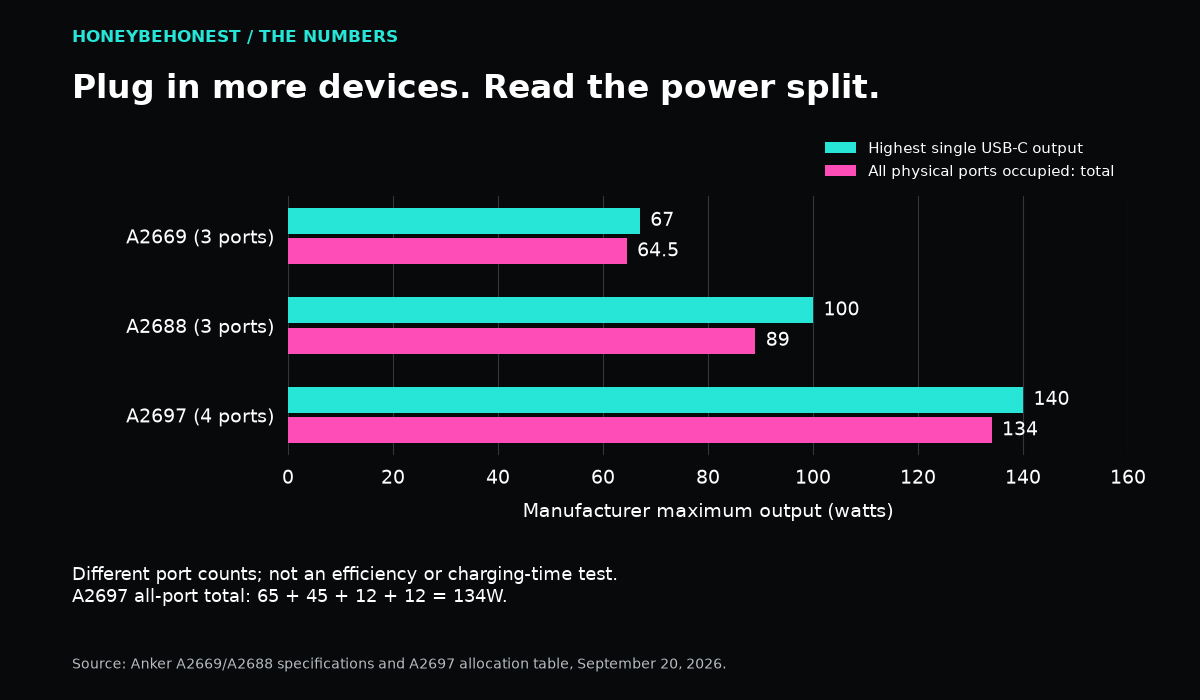
| Model | Highest single USB-C output | All physical ports occupied, total |
|---|---|---|
| A2669 | 67W | 64.5W across three |
| A2688 | 100W | 89W across three |
| A2697 | 140W | 134W across four |
Source: the Anker model specifications and allocation table linked above. These are manufacturer maximums, not measured sustained charging or charging times. The A2697 total is calculated as 65 + 45 + 12 + 12. Three-port and four-port totals describe different numbers of attached devices; the graph is a reminder to read the allocation, not a ranking of efficiency.
What to check before replacing the charger you already trust
Start with the laptop or tablet manufacturer’s recommended power supply and charging port. Some computers have special requirements, and some USB-C sockets are for data or display rather than charging the computer. Write down the exact model and how you use it. Charging a sleeping laptop and running demanding applications are different situations.
Then check the cable. A cable can fit and still be the wrong choice for the intended power level. Use one explicitly rated for the power and charging protocol your setup needs; for high-power modes, check both the charger and device instructions. Do not build a premium charging plan around a mystery cord from the back of the junk drawer. That drawer has never passed an audit.
Finally, plan the combination you will use most often. Which port gets the laptop? Which gets the phone? Does an older accessory still require USB-A? Look up the allocation for that arrangement. If you regularly need several demanding laptops at once, these compact wall chargers may not be the right category. A higher total rating is useful only when the port split meets the job.
If you need stored energy when there is no wall outlet, our portable power station comparison addresses a different job. These three chargers need mains power. A charger and a battery-powered source are separate purchases, even when both have USB-C ports.
Honey’s pick, without the wattage Olympics
Choose A2688 if its allocation fits your laptop plus smaller devices. Choose A2669 when you have checked that the lighter power budget is enough. Choose A2697 for a concrete fourth-port or compatible high-power single-device need, remembering that using every port changes the split. Keep the original charger until you have checked the new setup with your actual devices.
The point is fewer blocks and less cable drama, not a contest to own the biggest number. A good charger should quietly support your day. If buying it requires explaining why your perfectly adequate phone suddenly needs a workstation’s power supply, Honey, the marketing department may have gotten to you first.
The Story
Chargers are where perfectly intelligent people suddenly become optimistic. We see 140W on the box and assume every device gets 140W because that would be convenient. Electricity, unfortunately, has read the fine print.
Honey’s Bottom Line
Charging rule: one outlet can apparently become a family reunion. The right charger is the one that handles the devices you actually bring, without making you negotiate for a free USB-C port.
Disclosures
Affiliate disclosure: As an Amazon Associate I earn from qualifying purchases. When you use an Amazon link in this article, HBH may earn a commission at no extra cost to you.
Editorial disclosure: This is a research-based comparison using published manufacturer information and the linked product listings. Unless specifically stated, this is not a report of hands-on testing or personal use.
Artwork disclosure: The cover image is AI-generated Honey Be Honest editorial artwork and is illustrative; it is not a photograph of the exact products compared.


Leave a comment