The Verdict
The printer that earns a permanent place on your desk is the one that removes a recurring nuisance. For small address labels, folders and office organization, the Brother QL-810Wc is my Amazing pick when wireless access matters. QL-800 is Good for one computer connected by USB. QL-820NWBc is Mid for a simple home desk because its extra connections can be more than you need, but it becomes the sensible choice for a shared setup that actually uses them.
One deal-breaker first: these are narrow label printers, not 4-by-6-inch shipping-label machines. If your whole plan is printing large carrier labels for a shop, stop here and choose the correct format. Making the wrong label very quickly does not count as productivity. We checked these exact models and Amazon destinations on September 20, 2026; the judgments are based on documentation, not hands-on speed tests.
Three Brother QL printers, three sensible buying jobs
The Comparison
| Exact model and shopping link | Connection reason to buy | What it does not solve |
|---|---|---|
| Brother QL-810Wc (paid link) | Wi-Fi plus USB for a flexible desk | A need for 4-inch-wide labels |
| Brother QL-800 (paid link) | Direct USB for one computer | Phone-first wireless printing |
| Brother QL-820NWBc (paid link) | Wi-Fi, Ethernet, Bluetooth and USB | A reason to buy features you will not use |
All three use direct thermal printing. You avoid separate ink cartridges, but you still buy compatible label rolls. The useful cost comparison is your chosen label size and quantity, not a triumphant declaration that ink is free. Black-and-red printing requires the appropriate Brother DK-2251 roll; these are not full-color sticker printers. Color logos and photographs belong in a different shopping conversation.
Amazing for a flexible home office: QL-810Wc
The QL-810Wc (paid link) is the middle option that earns its place for a concrete reason: Wi-Fi. If a printer must live on a shelf rather than next to one permanently attached computer, wireless connectivity can make the layout less irritating. It also keeps USB available. That is a practical upgrade from the QL-800 rather than a vague promise that everything is somehow more professional.
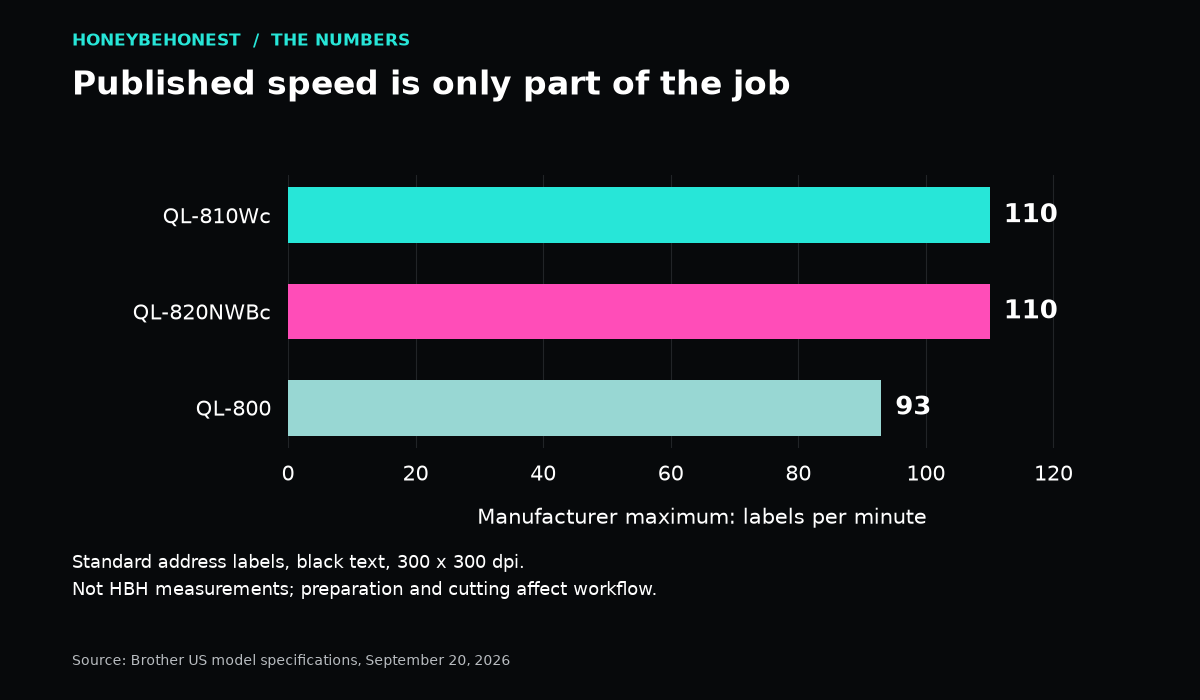
Brother lists up to 110 standard address labels per minute under its stated conditions. For ordinary household use, that headline is less important than getting the first label formatted correctly. Most of us are not labeling at the pace of a caffeinated warehouse. The workflow is opening the right template, checking the roll, proofreading the address and printing without a wrestling match.
Choose this model if you already know which computer or mobile device will send the jobs and have checked Brother’s current supported software. Wi-Fi alone does not make every app a label-printing app. A phone, a router and a label printer can all be working perfectly while the document format is still wrong. Compatibility must cover the actual device, application and label size.
My Amazing rating is therefore conditional: wireless access has to solve a real problem for you. If the printer never moves and one computer always uses it, the QL-800 can be the more reasonable purchase. The Brother QL-810Wc product page is the primary model reference.
Good when a cable is enough: QL-800
The QL-800 (paid link) keeps the decision pleasantly boring. It connects by USB and is rated by Brother for up to 93 standard address labels per minute. For occasional envelopes, folders and household organization, that is a different class of workflow from printing one label on a full sheet and then attempting scissors-based geometry.
I like it for someone who can point to the exact computer and desk where it will live. There is no need to pay for network connections simply because the word wireless sounds more modern. A cable is not a character flaw. It can be a clear, predictable relationship between the device that holds your information and the machine that prints it.
The limitation is location and access. A USB connection does not become a built-in Wi-Fi feature just because a seller’s page recommends a wireless accessory nearby. If two people expect to print independently from different devices, work through that arrangement before buying. Do not purchase the basic model and assume the software will erase a hardware limitation.
Brother’s QL-800 information supports the connection and speed figures used here. Check its current downloads against your operating system rather than relying on an old compatibility list copied into a marketplace description. That check is especially important with older models still sold alongside newer computers.
Mid for a basic desk, useful for shared work: QL-820NWBc
The QL-820NWBc (paid link) adds connections the simpler models do not offer together: wired Ethernet and Bluetooth as well as Wi-Fi and USB. It also has an LCD and supports standalone printing functions. Those can matter in a small office where different people need a predictable place to print recurring labels.
Standalone does not mean it magically knows what you want on a label. Templates and the intended workflow still need preparation. If your plan is one repeated label at a shared station, investigate the exact setup steps in Brother’s documentation. If your plan is typing a new address at your laptop every few days, the LCD is unlikely to be the deciding feature.
This is why I call it Mid for the simple home-office buying question, while acknowledging it can be Amazing in a different use case. Buying the highest model number is not a strategy. Paying for Ethernet makes sense when a reliable wired connection is part of your plan; paying for it because it sounds official is how a tidy desk budget quietly becomes a hostage situation.
See Brother’s QL-820NWBc model page for its connections and capabilities. Our link is the current ‘c’ model. Keep the complete model suffix in your comparison so you do not accidentally order a different listing or assume an older accessory bundle is included.
The Chart
The speed graph: an upper limit, not your daily workflow
| Model | Manufacturer maximum, labels per minute |
|---|---|
| QL-800 | 93 |
| QL-810Wc | 110 |
| QL-820NWBc | 110 |
Source: the three Brother model pages linked above. These published maximums use standard address labels with black text at 300 by 300 dpi; they are not HBH measurements. A 110-label figure is roughly 18% above 93 by arithmetic, but that does not mean your complete task will finish 18% sooner. File preparation, connection, label content and cutting choices affect the actual process.
For a ten-label job, the difference between these headline speeds is a poor reason to upgrade. For repeated larger batches, it becomes worth examining alongside connections and roll changes. Start with the task volume you actually have. Imaginary future businesses have talked plenty of us into buying equipment; they never help clean the spare room.
Labels are the system, not an afterthought
Before ordering, choose the label type you expect to use most. A narrow file-folder label, an address label and a longer custom label are different layouts. These printers support Brother’s DK roll system, with the exact supported sizes listed in the documentation. The maximum roll width is about 2.4 inches, which is why this trio cannot replace a printer that accepts a 4-inch-wide shipping label.
Check the starter supplies in the actual seller’s offer. A starter roll is not necessarily a full-size retail roll, and an accessory shown in a lifestyle image is not automatically in the box. Compare the cost of the printer plus the first appropriate replacement roll. Then consider how many labels you will realistically use before ordering a mountain of supplies.
Direct thermal printing also deserves a little care in storage and use. Follow the roll manufacturer’s guidance for heat, sunlight, surfaces and durability. Do not assume an ordinary office label is suitable for outdoor equipment, a dishwasher or long-term records. If those are your tasks, choose a labeling system and media specifically intended for them.
A five-minute check that prevents a very annoying return
Write down your computer or phone model, operating system and intended application. Confirm a supported path on Brother’s current downloads and support pages. Next, make or download an example label in the exact size you need. Check whether your application outputs a compatible label format instead of a full sheet with a tiny address floating in the middle.
Measure the desk space, allowing room for the power cord and labels to exit. Decide whether a USB cable can reach the computer comfortably. If several people will use the printer, decide who maintains the templates and replenishes the rolls. Apparently even a label maker needs someone to label the spare label rolls. Civilization is a demanding hobby.
For a wireless setup that also struggles elsewhere in the house, our home mesh Wi-Fi comparison looks at the network itself. A new printer will not repair weak coverage, and a new router will not fix an incorrectly sized template. Diagnose the nuisance before adding another box.
The HBH pick
For a home office that genuinely benefits from Wi-Fi, start with QL-810Wc. For one computer and a simple cable, QL-800 is the sensible Good choice. For a shared station with a specific need for Ethernet, Bluetooth or prepared standalone labels, investigate QL-820NWBc. Check current seller, condition and included supplies through the exact product links above.
The best label printer is not the one with the longest list of connections. It is the one that turns a regular irritating chore into a short, repeatable process. Buy for the label size, the device you own and the way you work. Then label the drawer before someone decides it is a new home for seventeen mystery charging cables.
The Story
I love organization right up until the organizing tool becomes its own full-time employee. The goal is not to build a museum of perfectly labeled bins. The goal is to find the charger without opening six drawers and questioning every life choice that led us here.
Honey’s Bottom Line
Label rule: the freezer is not a filing cabinet, but with labels it can pretend. Honey likes a printer that turns mystery bags into food you can identify before defrosting the wrong thing.
Disclosures
Affiliate disclosure: As an Amazon Associate I earn from qualifying purchases. When you use an Amazon link in this article, HBH may earn a commission at no extra cost to you.
Editorial disclosure: This is a research-based comparison using published manufacturer information and the linked product listings. Unless specifically stated, this is not a report of hands-on testing or personal use.
Artwork disclosure: The cover image is AI-generated Honey Be Honest editorial artwork and is illustrative; it is not a photograph of the exact products compared.


Leave a comment