
VERDICT: Give each HighLevel user only the access required for the job. Agency access, subaccount access, and granular permissions are not interchangeable. The safest setup is the one where an assistant can do the work without accidentally receiving every key in the building.
Here’s the quick comparison before I get into the weeds.
Quick Comparison
| Access Type | Best For | What I Watch |
|---|---|---|
| Agency-level | People who truly need to work across the agency | Broad reach; do not hand this out by default |
| Subaccount-level | Someone working inside one client or business account | Keeps access narrower and easier to manage |
| Granular permissions | Matching access to an exact role | Best choice when the user only needs specific tools |
VERDICT
I would start with the work the person is authorized to do and give the smallest permission set that lets that work happen. “Make them admin” is not a permissions strategy. It is a shortcut wearing a lanyard.
Start with the work a person is authorized to do, then grant the smallest set of HighLevel permissions that lets them do it. An assistant answering assigned conversations does not automatically need billing access, contact exports, workflow editing or the ability to change everyone else’s permissions.
“Just make them an admin” is convenient in exactly the same way leaving every cabinet unlocked is convenient. It eliminates a small setup chore by creating a much bigger trust decision.
Affiliate disclosure: my HighLevel link is an affiliate link. A qualifying purchase may earn HBH a commission at no extra cost to you. This guide does not certify an account’s security or regulatory compliance.
How I checked this: I checked HighLevel’s official role and permission guidance on October 4, 2026, including its subaccount guide updated October 1. This is a documentation-based access-planning guide; I have not inspected or tested your account.
Conceptual editorial artwork, not a security certification, platform screenshot or actual account configuration.
Begin with the job, not the person’s seniority
Write down the routine actions the person needs to perform and the changes that still require your approval. “Trusted assistant” is a relationship. “Reply to assigned contacts and maintain their appointments” is a usable access specification.
Keep platform permission separate from business authority. A button becoming visible does not authorize a new purchase, bulk export, deletion, campaign launch or public promise. Put those operational limits in writing even when software cannot express them perfectly.
Example responsibility: Respond to assigned inquiries
Access to evaluate: Relevant conversations and assigned records
Separate authority to retain: Bulk outreach and consent-policy changes
Example responsibility: Maintain appointment details
Access to evaluate: The calendars and actions genuinely required
Separate authority to retain: Changing company-wide availability rules
Example responsibility: Review a sales pipeline
Access to evaluate: Appropriate opportunity visibility
Separate authority to retain: Exporting a customer list or changing automation
Example responsibility: Build a workflow
Access to evaluate: Necessary workflow tools and approved test records
Separate authority to retain: Publishing high-impact changes without review
This is an editorial planning comparison, not a list of exact checkbox names or a universal role template.
Agency access and subaccount access are not interchangeable
HighLevel separates agency-level administration from work inside a subaccount. Its role guide describes agency responsibilities such as broader account management and subaccount work such as contacts, calendars and workflows. An administrator at one level should not be casually treated as the same thing at the other. Agency and subaccount role overview.
Before inviting someone, establish which business or client account they belong in. An assistant serving one operation should not receive access to unrelated clients merely because that was the easiest invitation path.
For a client handoff, list what the client will operate themselves and what your team will continue to maintain. Ambiguous ownership leads to a familiar mess: somebody changes a setting, nobody knows who was supposed to manage it, and the customer gets the consequences.
Use granular controls where the current interface supports them
The current subaccount guide distinguishes Admin and User roles and describes granular permission management under Settings and My Staff. It also documents “Only Assigned Data” for relevant assigned contacts, opportunities and associated appointments or tasks. Subaccount roles, permissions and assigned data.
Treat that as a useful control to inspect—not proof that every object in the account is perfectly isolated. Check the actual job with the actual user. A restriction that hides a contact list may not answer every question about reporting, exports, shared resources or other modules.
Copying permissions can save time, but copy a reviewed role, not an accumulated pile of exceptions. The person you copy from may have been given temporary privileges months ago that nobody removed.
Hidden tools can still have live consequences
HighLevel specifically warns that hiding a module does not stop workflows from continuing to operate. Removing somebody’s ability to see the workflow area therefore is not the same as pausing an automation. Permission visibility and workflow behavior.
Keep an authorized owner for live automation. When someone changes roles or leaves, inventory the processes they maintained, the connected services they were responsible for and the test evidence that establishes those processes still work. Do not disable everything without checking the effect on customers, and do not assume it is all fine because the old user disappeared from a list.
The same distinction applies to offboarding more generally: revoking a person’s login and reviewing the business processes they controlled are related jobs, not identical jobs.
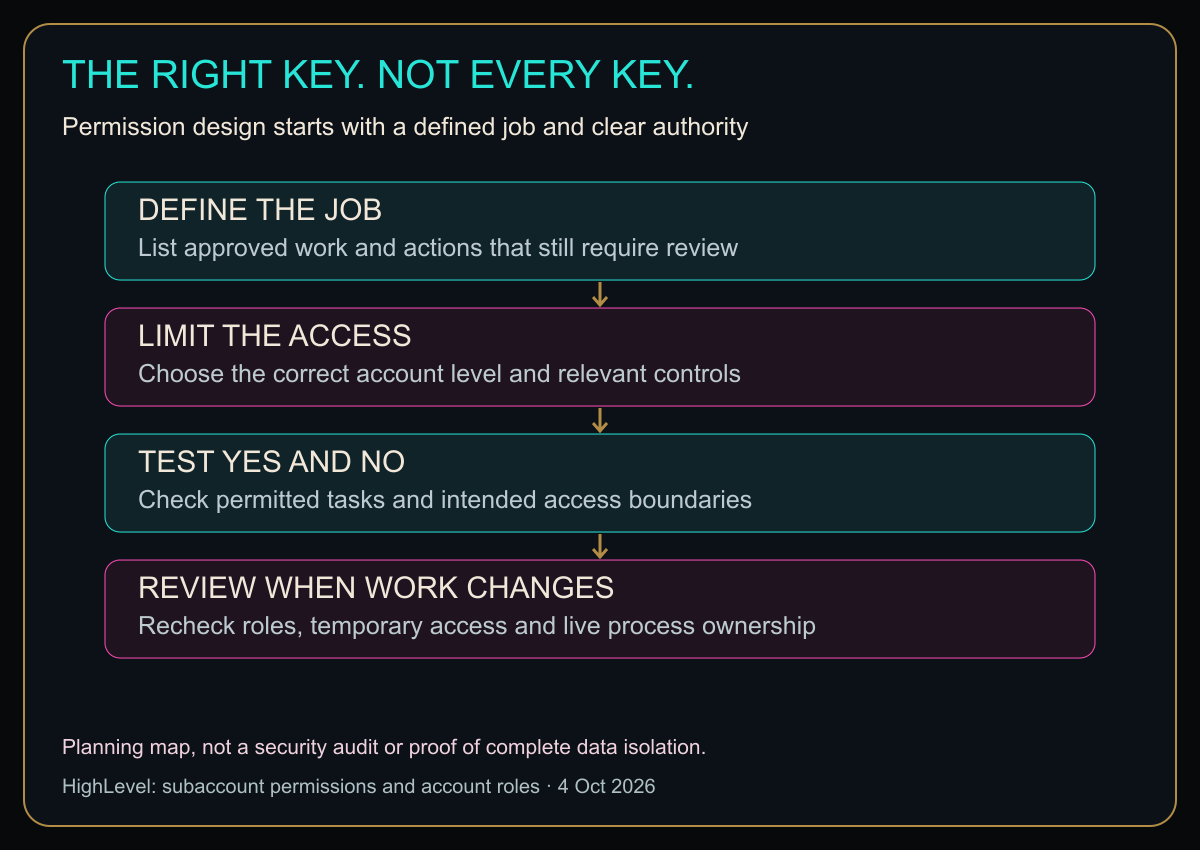
Open the diagram at full size for larger labels.
Original HBH access-planning map based on the cited documentation. It is not an audit result or guarantee of complete isolation.
Test the “no” as carefully as the “yes”
Have the authorized user check their own view without sharing passwords. Use a controlled record and a documented test plan. Verify that they can complete their actual task, then check that they cannot perform actions outside their role.
For example, an assistant assigned a test contact should be able to do the approved work on that contact. If your policy excludes unrelated customer records or exports, inspect the relevant controls and test those boundaries appropriately. Do not retrieve real customer data merely to prove a point when a safe test record will do.
Record expected and observed results separately. “I chose User” is a configuration statement. “The user completed the approved task and the prohibited action was unavailable in this test” is evidence. Even that evidence only covers the tested scenario, not every future feature or account change.
If a task fails, add the specific necessary permission after checking its scope. Do not jump straight to full administration to save five minutes of diagnosis.
Give access an owner and a review date
Maintain a compact register: user, business purpose, approved account, relevant permissions, approver and next review. Recheck when responsibilities change, a client engagement ends or a feature introduces a new capability.
Pay particular attention to temporary access. “Just for the launch” needs an end condition. Otherwise, temporary permission has a habit of becoming permanent through sheer forgetfulness.
Separate accounts also improve accountability. If everyone uses the same owner login, distinguishing a mistake from an intentional change becomes harder. Keep credentials private and follow the platform’s current authentication options; this article is not a substitute for a security review where sensitive or regulated data is involved.
Does HighLevel fit your team?
It is relevant if you need customer operations and team access managed together. Permission flexibility is useful, but it also means somebody must own the configuration and keep it aligned with the real business.
Explore HighLevel through my affiliate link
For the wider software decision, read my HighLevel small-business review. Do not buy a larger setup just to postpone deciding who should be allowed to do what.
Trust people and design sensible boundaries. Those are compatible ideas. Give each person the right key, explain what it opens, and check that the arrangement still fits when their job changes.
Diagram in plain text
- DEFINE THE JOB: List approved work and actions that still require review
- LIMIT THE ACCESS: Choose the correct account level and relevant controls
- TEST YES AND NO: Check permitted tasks and intended access boundaries
- REVIEW WHEN WORK CHANGES: Recheck roles, temporary access and live process ownership
Planning map, not a security audit or proof of complete data isolation.
Sources
- HighLevel subaccount roles, permissions and assigned data, updated October 1, 2026.
- Agency and subaccount user roles, updated May 6, 2026.
Checked October 4, 2026. Plan availability, interface labels and controls can change; verify the current account before applying live changes.
The comparison that keeps the settings straight
| Thing | What it controls | My sanity check |
|---|---|---|
| Agency-level access | Broad agency functions across accounts | I use it only when the job actually crosses accounts. |
| Subaccount access | One client’s/location’s tools and data | This is usually the cleaner starting boundary. |
| Granular permissions | Specific tools/actions inside the account | I test one allowed action and one forbidden action. |
| Assigned-data restrictions | Which records the user can see or work | I verify the user’s actual view instead of trusting the toggle name. |
Honey, Be Honest: Why I Went Looking
I went looking because permission screens are where software tries to turn a simple sentence—“she needs to answer messages”—into a scavenger hunt of toggles. The nerdy rule that saves me every time is least privilege: enough access to do the job, not enough access to accidentally redecorate the entire account.


Leave a Reply