
VERDICT: I treat Allow Re-entry and Stop on Response as two separate decisions. One controls whether a contact can enter again. The other can stop the current follow-up after a qualifying reply. Automation that keeps talking after the human answered is not persistence. It is a robot with boundary issues.
VERDICT
A follow-up workflow should know when to leave people alone. In HighLevel, Allow Re-entry governs whether a contact can run through a workflow again, while Stop on Response can end that contact’s run after a reply to a message from that workflow. These are different controls. Neither is a magic “no duplicates anywhere” switch.
Before adding another reminder, decide what event begins the conversation, what counts as a useful response, and who takes over afterward. Automation that keeps talking after the customer answers is not persistent. It is awkward with excellent timing.
Affiliate disclosure: my HighLevel link is an affiliate link. A qualifying purchase may earn HBH a commission at no extra cost to you. No response-rate or revenue result is promised.
How I checked this: I checked HighLevel’s official workflow-settings and call-action guidance on October 4, 2026. This is a documentation-based implementation guide, not a claim that I tested or own your setup.
Conceptual editorial artwork, not a HighLevel interface or a record of a customer conversation.
Start with the three questions your sequence must answer
What starts this run? What ends it? Can a later, separate event legitimately start it again? Put those answers in plain English before translating them into settings.
A one-time welcome after an inquiry is not the same as a reminder for every appointment. A person can book a second appointment without becoming a second person. Conversely, someone submitting the same inquiry twice does not necessarily need two parallel sales pitches.
Write a short operating rule: “After this inquiry, send the agreed follow-up; if they reply, the assigned person handles the conversation; do not automatically restart this same inquiry sequence.” That is an example policy, not a default HighLevel configuration. Your business might need a different one.
Re-entry is about another run, not unlimited simultaneous runs
HighLevel’s overview says Allow Re-entry ordinarily permits another run after a contact finishes or is removed; it does not add the same contact again while that run is active. The documentation also identifies appointment- and invoice-triggered exceptions, plus separate behavior when multiple opportunities are enabled. Check the actual trigger rather than assuming one toggle overrides every event type. Workflow settings overview.
That distinction matters when you troubleshoot “they got this twice.” Possible causes include separate workflows, multiple relevant business events or separate records. Do not change re-entry repeatedly until the duplicate message disappears; identify both sends and their execution histories first.
Question: Should the person return later?
What to establish: The event that justifies a new run
What this does not prove: That simultaneous messages cannot happen elsewhere
Question: Is another deal involved?
What to establish: Whether opportunity-specific runs are intended
What this does not prove: That both deals should receive identical follow-up
Question: Did they answer?
What to establish: Which message and workflow the reply belongs to
What this does not prove: That every automation has stopped
Question: Who owns the next action?
What to establish: A named team member and a response process
What this does not prove: That a stopped workflow creates a human handoff by itself
Stop on Response has a boundary
The documented setting stops the responding contact’s execution after a response to communications from that workflow. It does not mean that every contact stops or that all other workflows become aware of a global pause. Scope of Stop on Response.
Keep your next-step design explicit. Decide where the reply will be reviewed, who is responsible, and how they will distinguish a real request from an automated response or unrelated message. Review current channel behavior in your account before promising a customer that one reply will suppress every future communication.
Also keep ordinary conversation handling separate from consent and unsubscribe handling. A response is not permission to broaden marketing, and a workflow stopping is not evidence that every consent requirement has been satisfied.
The voicemail wrinkle deserves its own check
If the workflow includes a Call action, the combination of Stop on Response and voicemail detection matters. HighLevel documents that disabling voicemail detection can allow voicemail to count as the response that stops the workflow. Keeping detection enabled is intended to distinguish a person from a machine, with a possible connection delay. Call action and voicemail interaction.
Do not label “workflow ended” as “customer spoke to us.” Those are different observations. Your call record, result and next action need to support the claim. The documented behavior concerns workflow Call actions; do not extrapolate it to every manually placed call.
Choose your fallback before launch. If no human conversation occurs, should a team member review the attempt? If someone answers, what work should stop and what must continue? These are service decisions, not just settings to optimize for a longer sequence.
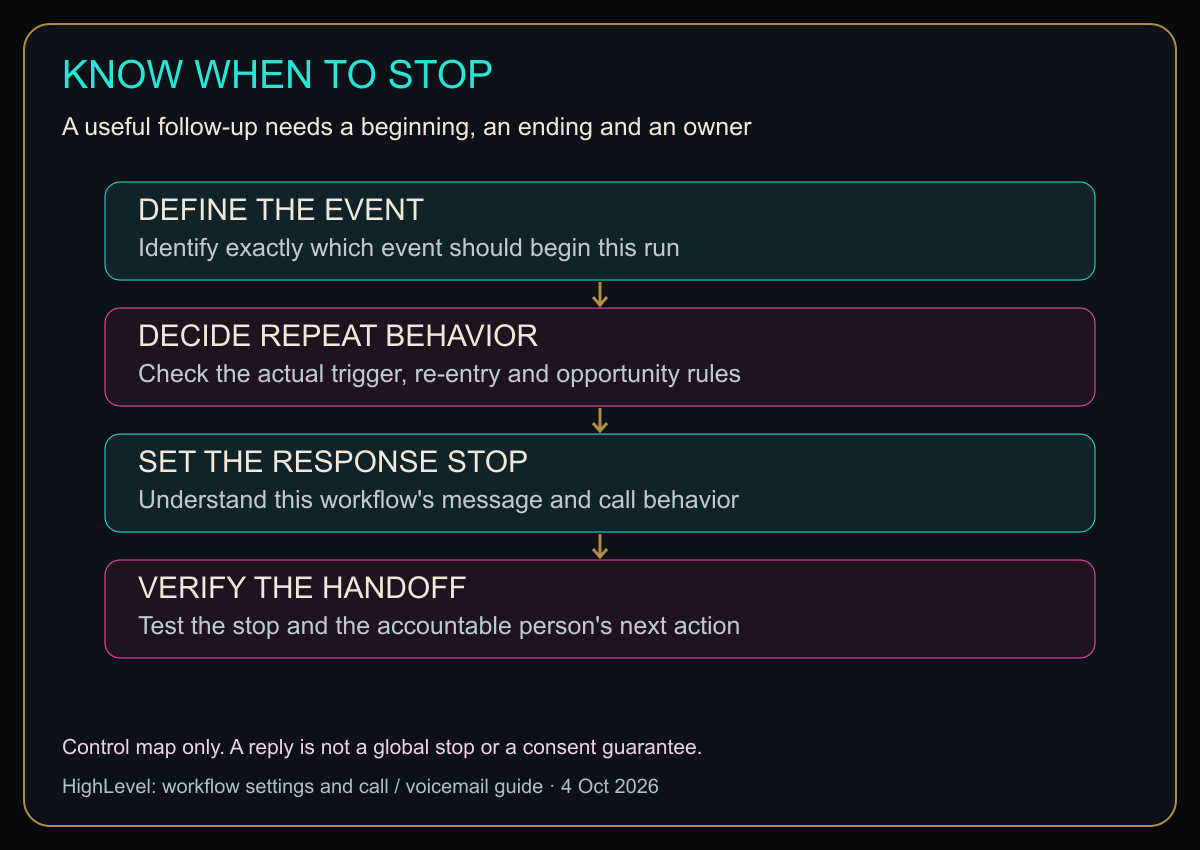
Open the diagram at full size for larger labels.
Original HBH implementation map based on the cited guides. It is a decision sequence, not an account-level test result or a messaging guarantee.
Test the stop, not just the first message
Use authorized test contacts and recipients who know the test is happening. A live workflow may send billable messages or make calls, so check permission, limits and costs before triggering it. Do not enroll a customer merely because their record is convenient.
Run a small acceptance checklist with expected and observed outcomes:
- A qualifying event begins the intended workflow once.
- A nonqualifying event does not begin it.
- A test reply stops the intended run under the documented conditions.
- Any required human follow-up remains visible and assigned.
- A later event either restarts or does not restart, matching your written policy.
- If calls are used, voicemail and a person answering are checked separately.
Keep the exact trigger, test record and execution history with each result. A green-looking canvas does not demonstrate these outcomes. Nor does a successful email preview prove how the workflow behaves after a reply.
Change one live behavior at a time
If an existing sequence is irritating people, first determine which sends are still pending and who has authority to change them. Document the current configuration and the intended correction. Avoid using the live audience as a trial-and-error laboratory.
After changing the relevant control, repeat the scenario that failed and check that a legitimate scenario still works. An automation can become beautifully quiet by breaking entirely; that is not the success I were after.
Is HighLevel the right tool for this job?
It is relevant when follow-up needs to connect to customer records and an accountable team process. If you cannot yet describe the trigger and handoff clearly, more workflow branches will not supply that clarity for you.
Explore HighLevel through my affiliate link
For a wider platform decision, see my HighLevel small-business review. This guide is about control behavior, not a recommendation to buy a plan you do not need.
A good follow-up knows why it started, when to stop and who speaks next. Give it all three instructions.
Diagram in plain text
- DEFINE THE EVENT: Identify exactly which event should begin this run
- DECIDE REPEAT BEHAVIOR: Check the actual trigger, re-entry and opportunity rules
- SET THE RESPONSE STOP: Understand this workflow’s message and call behavior
- VERIFY THE HANDOFF: Test the stop and the accountable person’s next action
Control map only. A reply is not a global stop or a consent guarantee.
Sources
- HighLevel workflow settings overview, updated September 3, 2026.
- Stop on Response, Call action and voicemail detection, updated November 4, 2025.
Checked October 4, 2026. Verify current controls and the exact trigger’s behavior before changing a live workflow.
The comparison that keeps the settings straight
Here’s the quick comparison before I get into the weeds.
Quick Comparison
| Thing | What it controls | My sanity check |
|---|---|---|
| Allow Re-entry | Whether a contact can enter the workflow again later | I only enable it for genuinely repeatable events. |
| Stop on Response | Whether a qualifying reply ends the current run | I test the exact message channel I use. |
| Trigger rules | What starts the run | I make the trigger specific enough to avoid accidental repeats. |
| Human handoff | Who owns the conversation after a reply | I assign the next action instead of letting the automation hover. |
Honey, Be Honest: Why I Went Looking
I went looking because nothing says “premium automation” quite like receiving another reminder after I already replied. That is the software equivalent of a person continuing a speech after I answered the question. I want the workflow smart enough to start, and polite enough to leave.


Leave a Reply