
VERDICT: I treat a duplicate suggestion as a candidate for review, not permission to merge. I verify identity, choose the surviving record deliberately and check active automations before clicking. A merge is easy. Unmixing two real people afterward is not.
VERDICT
Treat a duplicate suggestion as a candidate for review, not permission to combine records. HighLevel says completed contact merges cannot be reversed. Before you click, establish that the records really represent the same person and decide which record should survive.
Two people can share a surname, a household phone or a business inbox. “These look similar” is not a sufficiently thrilling reason to mix their conversations and account history together.
Affiliate disclosure: I may earn a commission at no extra cost to you if you purchase through my HighLevel link. A cleaner database is not a guaranteed financial return.
How I checked this: I checked HighLevel’s official merge, deduplication-preference and merge-workflow documentation on October 4, 2026. This guide contains an editorial safety process; no customer records were merged or tested for this article, and Honey’s personal use is not assumed.
Conceptual editorial artwork. No real contact details or account records are shown.
Review identity before reviewing fields
For each candidate pair, compare reliable identifying information and context. A matching email can be useful evidence, but a shared inbox may represent several people. A matching name alone is particularly weak. If the records’ identities remain uncertain, leave them separate and resolve the ambiguity first.
Record why you believe the pair is the same person. That short note makes the decision reviewable later and prevents the next team member from repeating the investigation blindly.
Candidate situation: Same verified person with an old and current address
Sensible action: Review for a deliberate merge
Why: Identity is supported; field choice still matters
Candidate situation: Same name, different context
Sensible action: Investigate
Why: Names are not unique identifiers
Candidate situation: Shared family phone or company inbox
Sensible action: Be especially cautious
Why: One matching field may represent several people
Candidate situation: Imported records with unexplained conflicts
Sensible action: Review a small sample and intake mapping
Why: Bulk action can multiply a mapping mistake
These are editorial review principles, not automated identity guarantees.
Choose the surviving record deliberately
HighLevel’s merge guide distinguishes manual selection from its Manage Duplicates tool. It asks you to select a master contact and review conflicting fields. The guide warns that some data is combined while other fields, including certain transaction-related records, default to the master; custom-field behavior also depends on whether the master’s field is already filled. Official merge guide.
Do not choose the master because it happens to be first in a list. Compare the information you trust most: current contact details, important business history and records the team actively uses. For complex cases involving payments, appointments or sensitive history, ask the provider to clarify the effect before proceeding.
Keep an authorized, securely stored record of essential pre-merge details where your organization’s policies allow it. That is an audit aid, not a promise that an export can restore every relationship after an irreversible merge.
Inspect live automations before changing identity underneath them
The workflow merge documentation warns that waits, goals and tracked links can depend on the old contact or message context. If the surviving record already has a run of the same workflow, the additional execution can end. This is why a contact cleanup is not merely cosmetic. Merge workflow behavior.
List the important active journeys for the candidate contacts. Will somebody be waiting for a reply? Is a team member following a time-sensitive task? Decide who will check those outcomes afterward. Do not indiscriminately restart campaigns to compensate; that can produce duplicate outreach.
If you cannot explain what should happen to an important active process, pause that merge decision and get clarification. You can continue reviewing uncomplicated candidates without gambling on the difficult one.
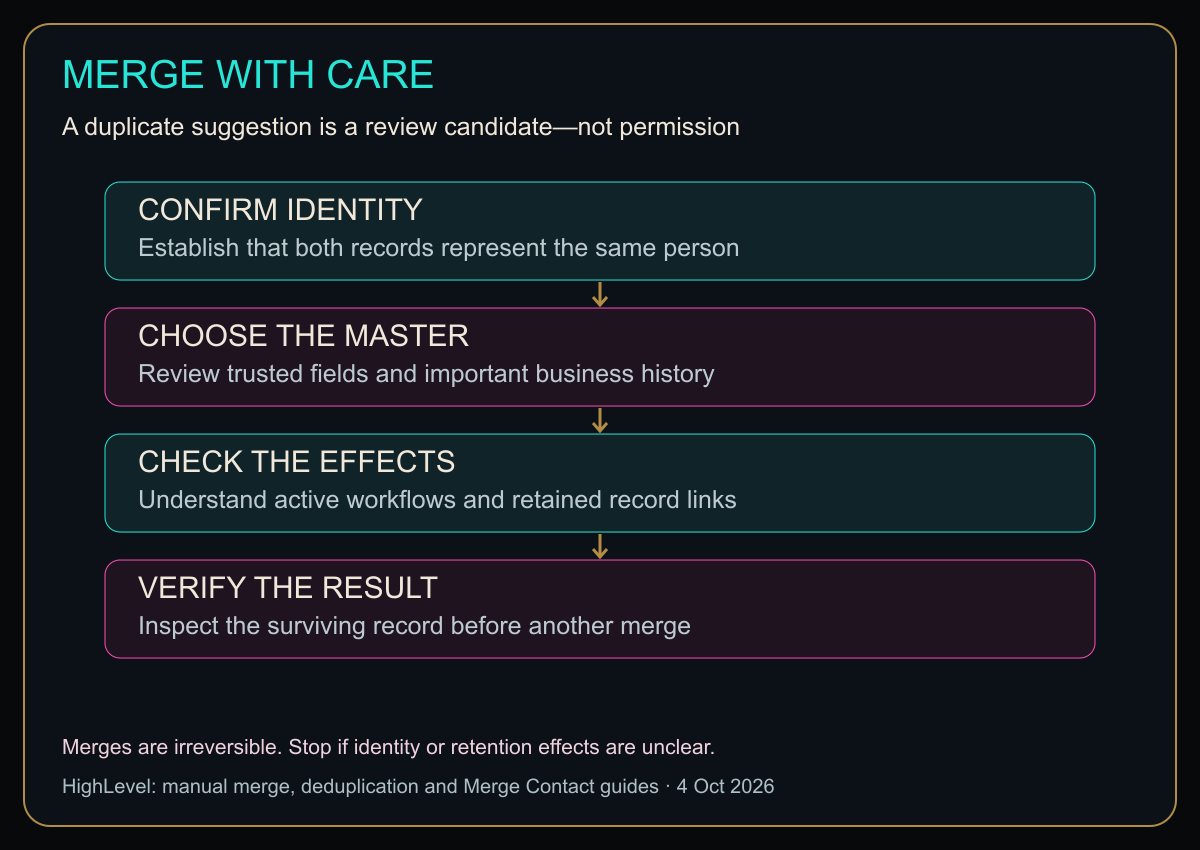
Open the diagram at full size for larger labels.
Original HBH safety map based on the official merge documentation. A suggested procedure, not proof that a merge is safe for every account.
Use the merge screen as a final review, not the first review
The official manual path starts from selected contacts in Contacts → Smart Lists, then More → Merge. Review the proposed master and field values before confirmation. The Manage Duplicates feature has its own permission requirements and matching options. Check which tool you are actually using. Merge instructions.
For your first cleanup, use a small known case rather than a large batch. Immediately check the surviving contact’s expected details, relevant history and active operational work. Only proceed to additional candidates once the result matches the documented expectation.
A missing field after a merge is a reason to stop and investigate, not evidence that you should merge more quickly to finish the list.
Prevention is different from cleanup
HighLevel’s deduplication preferences control how supported incoming submissions match existing contacts. The guide provides primary and optional secondary matching fields and distinguishes form/integration behavior from CSV imports. Changing the preference is not the same as reviewing and merging old duplicates. Contact deduplication preferences.
Trace a repeat duplicate back to its source. Is a form missing a consistently collected identifier? Are staff creating a new record without searching? Is an integration sending information in a different format? Fix the actual entry problem rather than scheduling an eternal cleanup party.
Document the chosen matching policy and test each relevant entry source with authorized sample records. Do not assume a setting that behaves correctly for a form has proved the same result for every import or connected app.
Do you need automatic merging?
HighLevel also provides a workflow Merge Contact action with email, phone or combined matching criteria. Its documentation says the newer matching record is merged into the older one. That fixed survival rule is a material difference from manually selecting your preferred master. Workflow merge action.
My editorial recommendation is to stabilize identity matching and understand the consequences before automating irreversible cleanup. Start with manual review where the data is messy or shared contact details are common. Automation is most useful after the decision rule is dependable.
Explore HighLevel through my affiliate link
If you are still evaluating the wider platform, see my HighLevel small-business review.
A clean contact list should be more accurate, not merely shorter. Confirm the person, choose the master, inspect the consequences—then decide whether to merge.
Diagram in plain text
- CONFIRM IDENTITY: Establish that both records represent the same person
- CHOOSE THE MASTER: Review trusted fields and important business history
- CHECK THE EFFECTS: Understand active workflows and retained record links
- VERIFY THE RESULT: Inspect the surviving record before another merge
Merges are irreversible. Stop if identity or retention effects are unclear.
Sources
- Manual merge and Manage Duplicates.
- Deduplication preferences.
- Workflow Merge Contact behavior and limitations.
Checked October 4, 2026. Do not perform an irreversible live merge when identity or data-retention effects are unresolved.
The comparison that keeps the settings straight
Here’s the quick comparison before I get into the weeds.
Quick Comparison
| Thing | What it controls | My sanity check |
|---|---|---|
| Duplicate suggestion | Flags records that may represent the same person | I verify identity before touching fields. |
| Merge | Combines records into one surviving contact | I choose the master record intentionally because completed merges are consequential. |
| Deduplication settings | Reduces future duplicate creation | I fix the intake cause instead of scheduling permanent cleanup. |
| Post-merge check | Confirms conversations, opportunities and automations still make sense | I inspect the survivor immediately after the merge. |
Honey, Be Honest: Why I Went Looking
I went looking because duplicate records have the same energy as identical Tupperware lids: everything looks harmless until I realize two completely different things have been stacked together. CRM cleanup is not the place I want to discover I trusted a matching last name too much.


Leave a Reply