
VERDICT: An evergreen webinar is a recorded presentation delivered through an automated registration path. I like the idea because the recording can keep working without me being live every time, but “automated” is not the same thing as “set it loose and hope the robots raise it well.”
I want the registration, timing, recording, follow-up, and offer to behave like one clean system. If one piece sends people into a dead end, the webinar is not evergreen. It is just a prerecorded scavenger hunt.
Here’s the quick comparison before I get into the weeds.
Quick Comparison
| What I’m Comparing | What Matters |
|---|---|
| Make sure you actually need an automated webinar | The official guide identifies Webinar and Unlimited plans for this feature. It describes an evergreen funnel, a required registration-date element and session availability rather than a fixed dated live… |
| Audit the recording before automating it | Watch the entire recording with a list of every dated or changeable claim: prices, software menus, product limits, deadlines and references to “this week.” Check each one against the current offer. Put an… |
| Build one complete registration route | The platform’s funnel guide treats the webinar funnel as a specialized three-page structure. Choose the evergreen goal rather than assuming an ordinary opt-in funnel automatically becomes a webinar. Check… |
| Make reminders helpful, not mysterious | Systeme.io’s webinar-email guide configures messages from the registration page’s Emails tab. Messages can be tied to registration or webinar start, with timing settings, and use the platform’s… |
VERDICT
Amazing: An honest prerecorded lesson with durable information and an offer that still matches what viewers see.
Good: Automated registration and reminders after the entire viewer journey has been tested.
Mid: Fake live energy, stale prices and a countdown doing more work than the presentation.
Affiliate disclosure: HBH may receive a commission at no extra cost to you if you purchase through my Systeme.io affiliate link. I do not promise webinar attendance, conversions or revenue.
How I checked it: I checked Systeme.io’s official evergreen-funnel and webinar-email documentation on October 4, 2026. This is a readiness guide with editorial recommendations, not a report of Honey hosting a webinar or measured sales performance.
Conceptual editorial artwork—not a real event, audience or software interface.
Make sure you actually need an automated webinar
The official guide identifies Webinar and Unlimited plans for this feature. It describes an evergreen funnel, a required registration-date element and session availability rather than a fixed dated live broadcast. It also says thank-you and conference pages are reached through registration, not simply by pasting their URLs into a browser. Evergreen-webinar setup.
Those limits matter before you upgrade. A prerecorded walkthrough that people can watch on a repeating schedule is one thing. A live workshop where you review participants’ work is another. Use a live-event tool for the latter after verifying its current features and costs; do not sell interaction your recorded funnel cannot provide.
Reader need: Repeatable prerecorded lesson
Editorial direction: Evergreen may fit
What to verify: Recording, registration and access path
Reader need: Live audience questions
Editorial direction: Choose a genuinely live workflow
What to verify: Presenter and attendee interaction
Reader need: One named event on a fixed date
Editorial direction: Verify a dated event tool
What to verify: Calendar date, timezone and capacity
Reader need: Simple video with no signup needed
Editorial direction: A direct video page may be enough
What to verify: Whether the funnel adds useful value
Do not make someone register for a tiny piece of information that would work better as a paragraph. The funnel should serve the lesson, not exist to prove you learned how to build a funnel.
Audit the recording before automating it
Watch the entire recording with a list of every dated or changeable claim: prices, software menus, product limits, deadlines and references to “this week.” Check each one against the current offer. Put an owner and next review date beside it.
If your video says “I can see everyone joining,” but there is no live presenter, edit it. If a discount never really ends, do not dress it up as a vanishing opportunity. Trust is harder to rebuild than a registration page.
A useful evergreen recording teaches something before asking for a purchase. Give viewers a concrete result they can understand and a clear explanation of who the next offer is for. Also say who should skip it. That is not bad marketing; it helps people make the right decision.
Build one complete registration route
The platform’s funnel guide treats the webinar funnel as a specialized three-page structure. Choose the evergreen goal rather than assuming an ordinary opt-in funnel automatically becomes a webinar. Check the current plan availability before committing money. Funnel types.
On the registration page, explain that the presentation is recorded, what it covers, roughly how much time to allow based on your actual finished recording, and whether there is an offer. Do not invent a duration while the video is still being edited.
Then register with an address you control. Follow the same confirmation and access steps the audience will receive. If a protected webinar page cannot be opened directly, that alone does not prove it is broken; test the documented route.
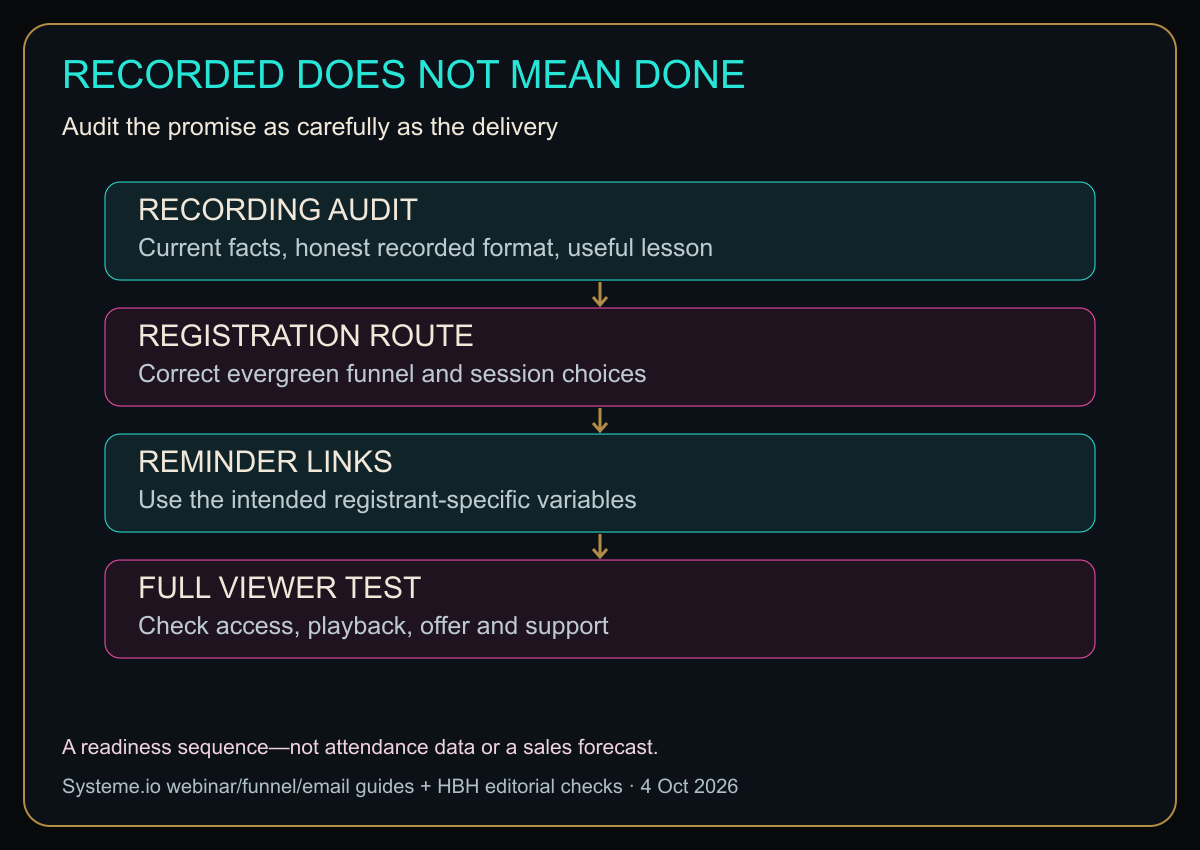
Diagram in words: RECORDING AUDIT: Current facts, honest recorded format, useful lesson. REGISTRATION ROUTE: Correct evergreen funnel and session choices. REMINDER LINKS: Use the intended registrant-specific variables. FULL VIEWER TEST: Check access, playback, offer and support. A readiness sequence—not attendance data or a sales forecast.
Original HBH readiness diagram. The registration and email stages are based on the official guides; the audit and complete-viewer test are editorial recommendations, not platform analytics.
Make reminders helpful, not mysterious
Systeme.io’s webinar-email guide configures messages from the registration page’s Emails tab. Messages can be tied to registration or webinar start, with timing settings, and use the platform’s registrant-specific session and replay variables. Use the supplied variables rather than copying one person’s private session link into a message for everyone. Webinar-email guide.
Read the actual message as a recipient. Is the presentation name clear? Does the displayed time make sense? Does the access link work for that registrant? Is the support route obvious if something goes wrong?
Avoid a pile of nearly identical reminders. Every email should answer a useful question: you are registered, here is how to join, here is the promised follow-up. Marketing permission and unsubscribe preferences still deserve care; automation is not an excuse to ignore them.
Use a go/no-go sheet before buying traffic
Mark each item checked, needs correction or not yet tested. Do not prefill the good column because the cover looks lovely.
- The registration copy honestly identifies the presentation as recorded.
- Every price, deadline and product claim in the recording is current.
- The offer page matches what the video promises.
- A new registrant can reach the presentation through the intended path.
- Email links work for that registrant, including any replay you promise.
- Audio is understandable on an ordinary phone speaker or headphones.
- Important slides remain readable on a narrow screen.
- Somebody owns support and the next content review.
If the offer changes, review the recording before increasing traffic. A video that was accurate six months ago is not automatically accurate today simply because the software still plays it.
Measure useful outcomes without inventing a success story
Keep registration, attendance or viewing evidence, purchases, refunds and support issues separate where your tools actually provide those metrics. Do not call registrations “viewers,” or treat a link click as proof that someone watched the whole presentation.
The first useful question is whether the audience can get through the journey and understand the offer. A small sample can identify obvious failures; it does not establish a universal conversion rate. I am not assigning a revenue forecast to this feature.
Explore Systeme.io through HBH’s affiliate link
For the wider context, read my sales-funnel explainer.
Can this replace a live workshop?
Not when live participation is part of the promise. The documented evergreen feature is an automated presentation, not live hosting.
Should a recording run forever without review?
No. Assign someone to recheck changing claims, links and the offer. “Evergreen” describes a delivery approach, not immunity from becoming outdated.
Record once if it makes sense. Review regularly because it still matters. Let automation handle delivery—not honesty.
Sources
Checked October 4, 2026. Plan names, limits and interface details should be rechecked before purchase or launch.
Honey, Be Honest: Autopilot Still Needs a Pilot
“Evergreen” sounds peaceful. Like the webinar just wanders into the woods, becomes self-sufficient, and sends me sales while I make coffee. Software has never once been that emotionally mature.
I still want to walk the route myself. Register. Wait. Watch. Click. Read the email. Follow the offer. Automation is great at repeating a process, including a broken one, with breathtaking consistency.


Leave a comment