
VERDICT: A working website proves the website connection works. It does not prove the email-sending domain is authenticated. I treat those as separate jobs because DNS apparently enjoys hiding several unrelated chores behind the same domain name.
If the page loads but email setup is still complaining, that is not the internet gaslighting me. It is usually a different record, a different verification step, or a sender setting that still needs attention. Very nerdy. Very normal. Very annoying.
VERDICT
Amazing: Keeping the working website intact while you document and verify the exact email changes needed.
Good: A distinct, planned subdomain when you want a funnel alongside an existing site.
Mid: Deleting DNS records because a tutorial screenshot looks different from your account. Those little rows may be doing important jobs.
Affiliate disclosure: The Systeme.io link in this article is an HBH affiliate link. Qualifying purchases may earn me a commission at no extra cost to you.
How I checked it: I checked Systeme.io’s official domain, email-authentication and sender-verification guidance on October 4, 2026. This is an explanatory setup guide, not a report that I changed or tested Honey’s DNS or email account.
Conceptual HBH artwork. No live DNS records or account interface are depicted.
Three different checks, three different kinds of proof
Job: Website connection
What you are trying to establish: Visitors reach the intended pages
Useful completion evidence: The correct public hostname and homepage load securely
Job: Sending-domain authentication
What you are trying to establish: The domain is configured for this sending service
Useful completion evidence: The platform and DNS checks recognize the supplied records
Job: Sender-address confirmation
What you are trying to establish: You control the address selected as sender
Useful completion evidence: Its verification state is confirmed in the account
The comparison above is a practical checklist, not a guarantee of inbox placement. Email quality, recipient permission and provider filtering still matter after technical setup.
First protect the website you already have
Systeme.io’s root-domain guide warns that directing an already-used domain to its platform changes where that site lives. It also distinguishes root-domain setup from subdomain setup. Decide whether you intend to move the existing website or add a separate funnel address before changing anything. Domain connection guide.
For example, a business might want to keep its current blog and put a new funnel on a separate hostname. That is a planning example, not a recommendation to copy a particular DNS value. The correct destination and record names must come from the actual platform account and the instructions for your DNS provider.
Make an inventory of the current records and the services they support. If you do not recognize a record, identify it before removing it. “It looks old” is not a technical dependency check.
Configure web routing from your own account’s records
The root-domain instructions begin in Settings → Custom Domains, where adding the hostname generates the records to use. The guide also requires a homepage and discusses host-specific root redirection. It warns that conflicting records need investigation with the host rather than blind removal. Official web-domain procedure.
Use the provider-specific instructions for the hostname you are configuring. Do not transplant an example’s random-looking validation string into your own domain. A screenshot is an illustration, not your personal configuration file.
Once saved, check the exact public address, including the intended secure version and the page a visitor sees at the base address. A successful test of a long funnel URL does not prove that the bare homepage sends people somewhere useful.
Authenticate sending separately
For sending authentication, Systeme.io points to Settings → Emails → Domains. Its guide generates three CNAME records and a DMARC record for the DNS host. It requires a custom domain, not a domain owned by a public mailbox provider, and says a domain can be authenticated in only one Systeme.io account or sub-account. Email-authentication guide.
Copy values from your own account. If your domain already has an email policy or records for other senders, do not replace them with a generic example just to make one screen turn green. Ask the people responsible for those services to reconcile the configuration. This article deliberately does not supply a one-size-fits-all DNS record to paste.
Keep website routing separate from mailbox service and sending authentication in your notes. The goal is to add the intended capability without quietly breaking something that already works.
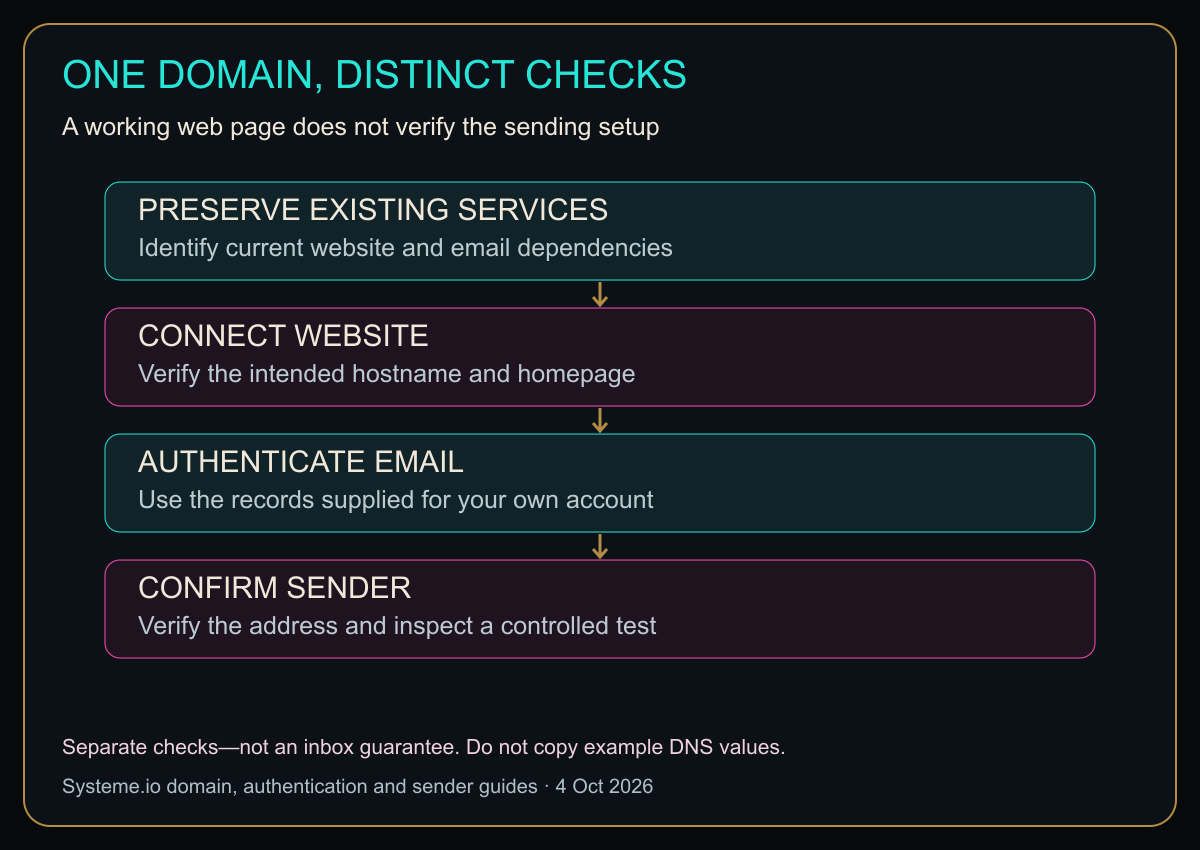
Diagram in words: PRESERVE EXISTING SERVICES: Identify current website and email dependencies. CONNECT WEBSITE: Verify the intended hostname and homepage. AUTHENTICATE EMAIL: Use the records supplied for your own account. CONFIRM SENDER: Verify the address and inspect a controlled test. Separate checks—not an inbox guarantee. Do not copy example DNS values.
Original HBH setup map based on the official guides. These are separate checks, not interchangeable statuses or an inbox-delivery guarantee.
Confirm the actual sender address
In Settings → Emails, the sender-confirmation guide uses Verified email addresses. Add the intended address and complete the confirmation sent to that inbox. The guide distinguishes this from authenticating the domain; it also notes an exception for the account’s login email address. Sender verification.
Use an address somebody actually monitors. A polished sender name does little good if replies disappear into an abandoned mailbox. Send a small authorized test to an address you control and check what the recipient sees, where replies go and whether the links work.
Do not treat that one delivery as proof that every recipient will receive future campaigns. It establishes a limited test result for that message and mailbox, nothing more.
When something is still red, diagnose before you repeat
Compare the record name, type and value against the current account instructions. Check whether the DNS provider appends the domain name automatically; avoid accidentally entering it twice. For formatting questions or existing-record conflicts, use that provider’s guidance rather than guessing.
Record when you changed the settings and what status you observed. DNS changes can take time to appear consistently; repeatedly changing correct values can make the investigation messier. Systeme.io’s root-domain guide allows up to 24–48 hours for full propagation. Propagation and conflicts.
If a deadline is approaching, keep the working website and existing mail service intact while seeking support. A late campaign is inconvenient. Breaking the business’s regular email while trying to fix marketing email is a more ambitious kind of inconvenient.
Should you choose Systeme.io for this?
Consider it when the funnel and email features fit your overall business workflow, not because you expect a domain wizard to replace planning. Check current plan limits and your existing website and mail dependencies before moving anything.
Explore Systeme.io through HBH’s affiliate link
If you are still deciding what the funnel is supposed to do, read my sales-funnel guide before rearranging its plumbing.
Does a working website mean sending authentication is complete?
No. Verify the email configuration and sender address separately.
Should I delete a conflicting DNS record?
Only after its purpose and the consequences are understood. Get the host or responsible administrator to help if the dependency is unclear.
One domain can have several jobs. Keep the jobs separate on your checklist, and do not evict your website while trying to introduce your newsletter.
Sources
Checked October 4, 2026. Use the live records for your account and registrar; examples are not universal values.
Honey, Be Honest: DNS Has the Personality of a Filing Cabinet
DNS is one of those systems that makes perfect sense after somebody explains it and absolutely no sense while I am staring at twelve record types that all look like they were named by a committee of routers.
I keep the jobs separate in my head: website points here, email proves itself there, sender address gets verified over there. Once I stop expecting one green checkmark to bless the entire domain, the whole thing gets a lot less mystical.


Leave a comment