
The Verdict
A water-leak sensor is not the glamorous smart-home purchase. Neither is standing barefoot in the laundry room wondering why the floor suddenly has a tide schedule. For a fresh setup, I would shortlist the GoveeLife Water Leak Detector 1s kit (paid link); for an existing Tapo home, the Tapo T300 (paid link); and for someone already using Aqara automation, the Aqara Water Leak Sensor T1 (paid link). The best choice is the one that can reliably alert the right person in your particular house.
All three detect water where their probes are placed. They do not inspect every pipe, predict the next leak, or automatically shut off your water on their own. That distinction is the whole buying decision. A warning device and an automatic shutoff system are related ideas, not interchangeable products wearing different prices.
The comparison that matters before the floor gets involved
| Exact option | HBH judgment | What else it needs |
|---|---|---|
| GoveeLife 1s, three-sensor gateway kit (paid link) | Amazing for starting several monitored spots together | Compatible gateway, network and notification setup |
| Tapo T300, one sensor (paid link) | Good if your home already uses Tapo | Compatible Tapo hub for app and hub features |
| Aqara Water Leak Sensor T1, one sensor (paid link) | Mid as a fresh standalone purchase; useful in an Aqara home | Compatible Aqara hub, sold separately |
GoveeLife 1s: count the sensors and the gateway
The current GoveeLife 1s page identifies H5044 as the gateway and H5059 as the sensor. The gateway uses 2.4 GHz Wi-Fi. This is a different product family from older Govee leak detectors, so expansion sensors should be matched to the gateway’s current compatibility list. A shared brand name does not guarantee that the little white pucks will all become friends.
The three-sensor kit makes practical sense for a first installation because it encourages you to think in locations. Under a sink, beside the washing machine, and near another plausible leak source are three separate monitoring jobs. They still need sensible placement. A detector perched on a shelf above the water’s likely path can remain perfectly dry while your cabinet performs an expensive aquarium impression.
Govee advertises a built-in alarm, app alerts and a long-range sensor connection. Treat the quoted range as a manufacturer claim, not a promise through your exact walls and floors. I would test the route between each final placement and the gateway before trusting the setup from another zip code. Moving one sensor a few feet can matter more than a large number on the box.
Why Amazing here? It supplies a coherent starting system for someone without a hub. That is an editorial judgment about setup practicality, not a laboratory verdict on detection speed. If you already own a different compatible ecosystem, replacing it purely to follow a ranking may be an unnecessary detour.
Tapo T300: useful local noise plus a connected path
Tapo’s T300 documentation lists probes on the top and bottom, a built-in alarm rated up to 90 dB, two replaceable AAA batteries and IP67 protection. A compatible Tapo hub adds app notifications and hub-based actions. The linked listing is one T300 sensor; do not mistake it for a bundle that includes the hub.
The top-and-bottom arrangement is useful to understand when choosing a location. A drip from above and a puddle creeping across a surface are not the same path. Put the sensor where the relevant probes can encounter the water you are trying to catch, while following the placement instructions. Do not cover it with a tidy basket and then expect it to supervise the entire room.
The local alarm is especially relevant when somebody is home. A notification is useful when somebody is away. Those functions deserve separate testing: can you hear the device where you normally sit, and does the intended phone receive the alert? A muted phone in a handbag is not a comprehensive emergency plan. Neither is a siren on the opposite side of a closed house.
This is the Good pick for an existing Tapo setup because adding one purpose-built device can be simpler than introducing a second ecosystem. You can give each sensor a plain location name and use the same familiar app. “Laundry, behind washer” will be far more helpful during an alert than “sensor_final_FINAL.” We have all met that file name. It should not be managing the plumbing.
Aqara T1: buy the ecosystem on purpose
The Aqara T1 FAQ explains that the sensor uses Zigbee to communicate with a hub and cannot operate independently as a complete connected system. When water bridges its probes, it reports the event so the hub can raise an alarm or run supported automations. Its model-specific manual identifies WL-S02D and a CR2032 battery.
That makes T1 a reasonable addition for someone who already uses a compatible Aqara hub and knows how their notifications work. It is a less compelling first purchase if you thought one tiny sensor was everything needed. My Mid verdict applies to that mistaken standalone plan. The product becomes more useful when its supporting system already exists.
Aqara discusses automations involving water-control equipment, but the sensor itself is not a valve. Any shutoff arrangement needs separately selected compatible hardware, a supported automation, proper installation and testing. Do not buy a sensor and assume the water supply has learned to turn itself off. The distinction may be boring before a leak; it becomes rather interesting during one.
A maintenance comparison, not a reliability ranking
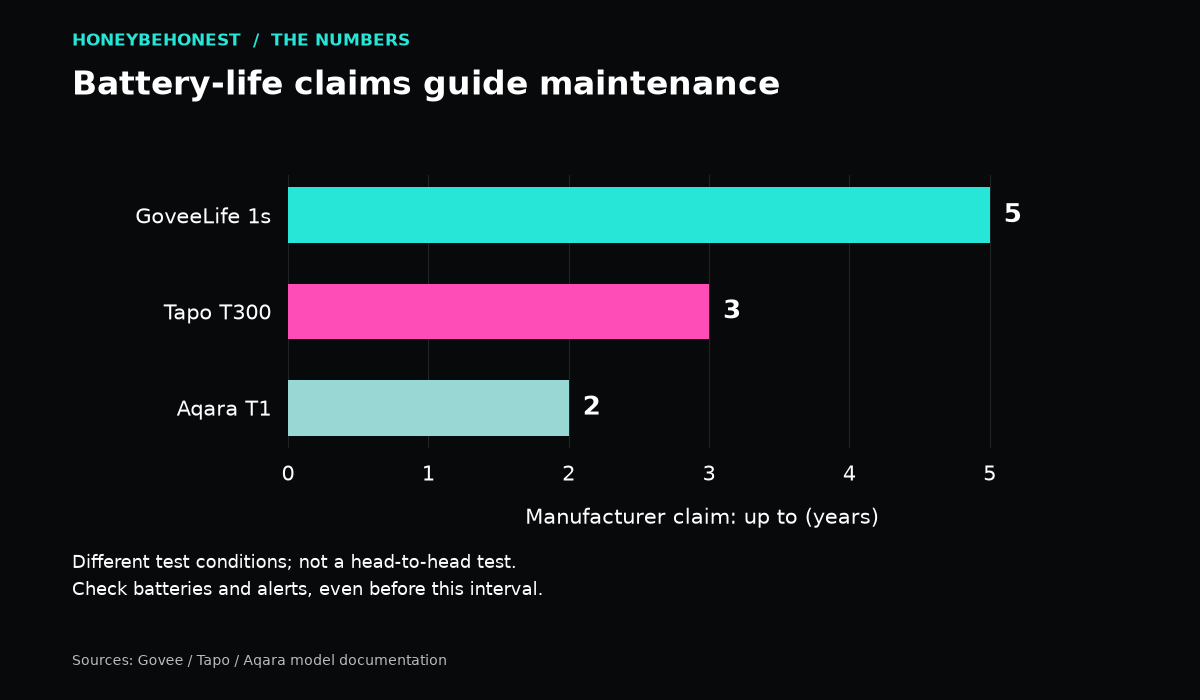
| Sensor | Battery-life claim | Years |
|---|---|---|
| GoveeLife H5059 (1s) | Up to five years | 5 |
| Tapo T300 | Up to three years in standby | 3 |
| Aqara T1 | Two years under stated conditions | 2 |
The chart and table show years from each manufacturer’s published claim. Sources: Govee 1s, Tapo T300’s standby specification and Aqara’s T1 catalogue. The September 21 source check adds an important qualification: Tapo’s FAQ gives up to 1.5 years with three minutes of alerts per month. Alarm use, settings and surroundings affect actual life. These are different manufacturer test conditions, not comparative HBH testing or a replacement schedule. Longer bars do not establish a safer sensor.
Set up the response before you need it
Name the sensor by its actual location, watch for low-battery warnings, enable the needed alerts and follow the maker’s test procedure. Tapo’s FAQ says T300 provides a low-battery reminder rather than a continuous battery-status display, so do not wait for a handy percentage countdown. Confirm the notification on the phone of the person expected to respond. If a second household member should know, use the app’s supported sharing or alert features and verify that separately. “I assumed you got it too” is a terrible maintenance strategy.
Decide what happens when nobody is nearby. A vacation property may need a trusted local contact and an understood way to access the building. The technology can tell you something happened; it cannot provide the adult with the key. Keep the response plan simple enough to use when you are busy, half awake, or several hours away.
After any alarm, identify the source of the water, address the problem safely, and follow the manufacturer’s drying and reset directions. Water resistance describes the sensor’s protection under specified conditions. It is not permission to ignore a submerged device indefinitely, and it says nothing about the safety of electrical equipment beside the leak.
If alerts fail because the network is unreliable, deal with coverage and hub placement first. Our mesh Wi-Fi comparison covers that separate purchase. If cleaning up is already on the agenda, remember that a wet-cleaning appliance is not flood remediation equipment; use it only within its intended instructions.
Honey’s call
Start with the GoveeLife 1s kit when you need a ready group of monitored locations. Add T300 when Tapo is already the sensible home for your devices. Choose Aqara T1 when its hub and automation requirements fit your existing plan. Then test the damn alerts. A perfectly chosen sensor still needs a human who knows what its notification means and what to do next.
Honey’s Bottom Line
The laundry-room test: nobody wants to become a barefoot detective at 2 a.m. If a tiny sensor can yell before the puddle becomes a renovation project, Honey calls that a pretty good use of technology.
Disclosures
Affiliate disclosure: As an Amazon Associate I earn from qualifying purchases. When you use an Amazon link in this article, HBH may earn a commission at no extra cost to you.
Editorial disclosure: This is a research-based comparison using published manufacturer information and the linked product listings. Unless specifically stated, this is not a report of hands-on testing or personal use.
Artwork disclosure: The cover image is AI-generated Honey Be Honest editorial artwork and is illustrative; it is not a photograph of the exact products compared.


Leave a comment