The Verdict
For a first smart plug, I would start with the Tapo P110M (paid link) if seeing electricity use is part of the point. The Tapo P125M (paid link) is the simpler light-switch option, while Eve Energy with Matter (paid link) makes more sense when you already have a compatible Thread setup. Buying the fanciest plug before checking your home network is how a ten-minute convenience project becomes your entire damn Saturday.
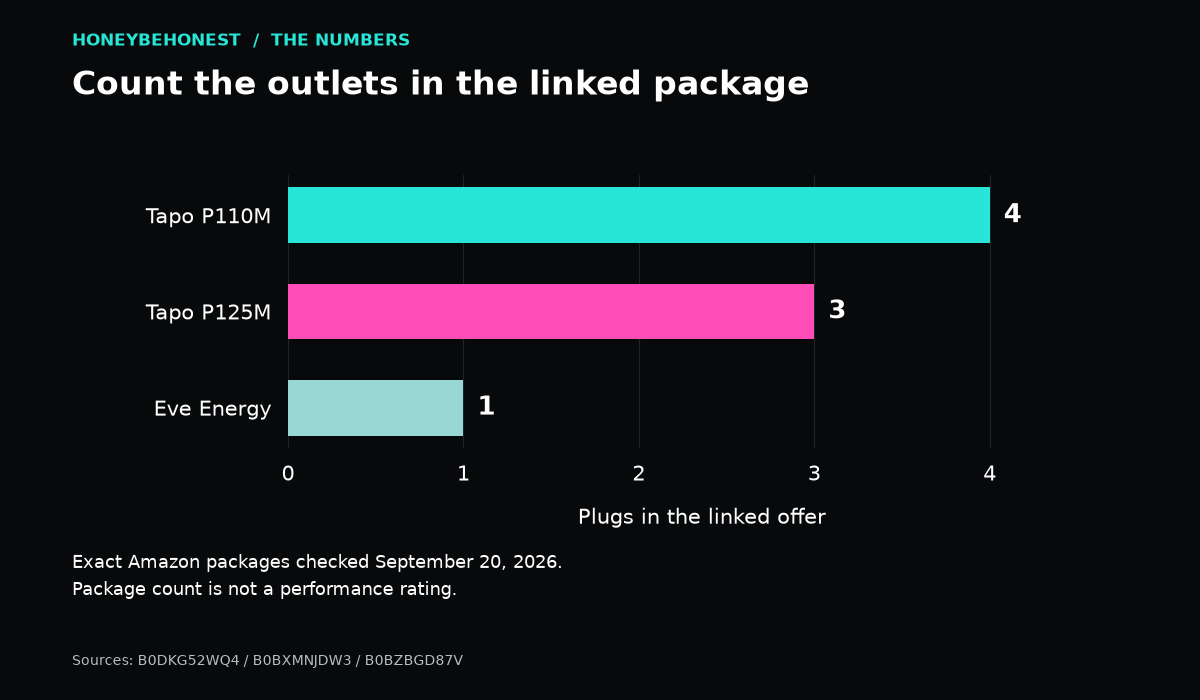
These are three indoor US smart plugs, but the linked packages are different: four P110M plugs, three P125M plugs, and one Eve Energy. Compare the cost per outlet you will actually use. A four-pack is not automatically a bargain if three plugs spend the next year in the drawer with the mystery remote.
The quick comparison: Amazing, Good, or Mid for your home?
The Comparison
| Pick | What earns its place | What could make it wrong |
|---|---|---|
| Tapo P110M, four-pack (paid link) — Amazing for curious beginners | Matter over Wi-Fi plus energy monitoring in Tapo | Four outlets may be more than you need; energy features differ by app |
| Eve Energy, one Matter plug (paid link) — Good for an existing Thread home | Thread networking and Eve’s local-first approach | Needs the right Matter controller and Thread border router |
| Tapo P125M, three-pack (paid link) — Mid for energy tracking; useful for lamps | Basic scheduled on/off control with Matter | No energy monitoring; a timer may already do your job |
Tapo P110M: the one I would shortlist for energy questions
P110M’s useful distinction is measurement. The US Tapo product page documents consumption tracking and entering electricity rates for cost estimates. Those estimates are information, not a promise that the plug will pay for itself. You still have to decide what to switch off and when. Buying a dashboard and then ignoring it is simply giving your clutter a login.
That makes this the most interesting choice for someone asking, “What does that desk setup actually use?” or “Did my lamp stay on all afternoon?” A plug-level reading is easier to act on than a whole-home bill, because the question is attached to one load. It will not separate the devices on a connected strip into individual readings. If you want to compare two appliances, measure them separately under sensible, comparable conditions.
I would start with one noncritical lamp, name it something obvious, and build one useful schedule. Then look at the data. This is less exciting than connecting fourteen things before dinner, but it also leaves you capable of turning on the light without needing a family meeting. Anyone else using the room should know the physical button and the ordinary fallback.
The four-pack suits several deliberate placements: office lamp, living-room lamp, decorative lights, and a spare for a compatible small device. It is not a shopping assignment to fill every outlet. The product’s published current rating is a ceiling, not blanket approval to automate heaters, cooking equipment, or appliances whose own instructions prohibit remote operation.
Eve Energy: a better fit when Thread is already in the house
Eve Energy uses Matter over Thread rather than joining your Wi-Fi like these Tapo plugs. Eve’s setup guidance requires a compatible controller and Thread border router; “no proprietary bridge” does not mean “no supporting hardware.” Check the exact hub model, not just whether something in your home has Alexa or an Apple logo.
Eve’s product documentation emphasizes local communication without an Eve cloud account and describes the plug helping extend a Thread network. That appeals to someone intentionally building that kind of home. It is less persuasive if your only ambition is turning off a bedside lamp and you would need to buy additional equipment first.
Energy-history access and automation controls depend on your chosen platform and app. Matter compatibility gives you a route into supported ecosystems; it does not make every vendor’s interface identical. Before buying, check that the particular energy view you want is supported on your phone and platform. “Works with my assistant” and “shows exactly the report I pictured” are two different promises.
My Good verdict is about fit, not an accusation that Eve is second-rate. In an established Thread home, it could easily become the Amazing option. In a household that has never heard the words “border router,” the setup homework belongs in the decision, not in a surprise footnote after checkout.
Tapo P125M: boring in the way a light switch should be
The P125M handles scheduled switching and supported voice control, with a compact design and 2.4 GHz Wi-Fi. It does not add the P110M’s energy-monitoring job. That matters if you searched for a smart plug with an electricity monitor and the almost-identical model names started to blur together.
For decorative lighting, the missing energy graph may be completely irrelevant. If you want the living room to feel occupied at evening time, or you keep forgetting a lamp when leaving, basic switching may be enough. P125M is Mid specifically for the reader buying data. For the reader buying a predictable on/off routine, simple can be excellent.
A smart plug also cannot push a separate button on the device connected to it. Test the appliance’s behavior when ordinary power returns. A lamp with a mechanical switch left on is a different proposition from a touch-controlled gadget that powers up in standby. Electricity arrives; the gadget still has to cooperate. That is not a firmware mystery. That is the job description.
The package-size trap, visualized
The Chart
| Exact linked listing | Plugs in package | Outlets to justify |
|---|---|---|
| Tapo P110M | 4 | ■■■■ |
| Tapo P125M | 3 | ■■■ |
| Eve Energy Matter | 1 | ■ |
Each square represents one plug. Source: the three exact Amazon package listings checked September 20, 2026. This is a package-count comparison, not a quality score. Compare like-for-like totals after you count the locations you actually need, and remember that Eve’s required supporting hardware is separate if you do not already own it.
What to check before the first setup
Write down the Wi-Fi name you intend to use and confirm the supported band. Check that your phone, home controller, and relevant apps are current. Save the Matter setup code somewhere accessible to the household. Avoid naming the device “new plug 2” unless your hobby is shouting increasingly personal instructions at a speaker that has no idea which lamp you mean.
Decide whether you need a schedule, phone control away from home, or a platform automation. Those are related features with different dependencies. A local automation surviving an internet interruption does not mean you can control your house from another city without a working connection. Likewise, a power outage stops a mains-powered plug regardless of the logo on its box.
For a home with spotty wireless coverage, address that first. Our eero mesh comparison explains the bigger network choice, while the Echo speaker comparison helps separate voice-assistant shopping from the other equipment your system may require. A new plug will not make a weak signal develop a work ethic.
Honey’s buying answer
Choose P110M when energy visibility is part of the reason to automate. Choose Eve Energy when its Thread requirements fit hardware you already own and you value its local approach. Choose P125M when reliable basic switching is the whole assignment. Start small enough that you can explain the routine to another human in one sentence. The best smart home improvement should remove a little friction from your day, not promote you to unpaid household IT.
The Story
Smart-home shopping gets stupid when every box starts promising an ecosystem. Honey, I just wanted the Christmas lights to turn themselves off. I did not ask the lamp to join a coalition government.
Honey’s Bottom Line
Outlet rule: a smart plug should make life easier, not become the smartest person in the house. Honey likes automation right up until the plug develops more opinions than the people using it.
Disclosures
Affiliate disclosure: As an Amazon Associate I earn from qualifying purchases. When you use an Amazon link in this article, HBH may earn a commission at no extra cost to you.
Editorial disclosure: This is a research-based comparison using published manufacturer information and the linked product listings. Unless specifically stated, this is not a report of hands-on testing or personal use.
Artwork disclosure: The cover image is AI-generated Honey Be Honest editorial artwork and is illustrative; it is not a photograph of the exact products compared.


Leave a comment